Where to report a poor road condition in the Republic of Cyprus
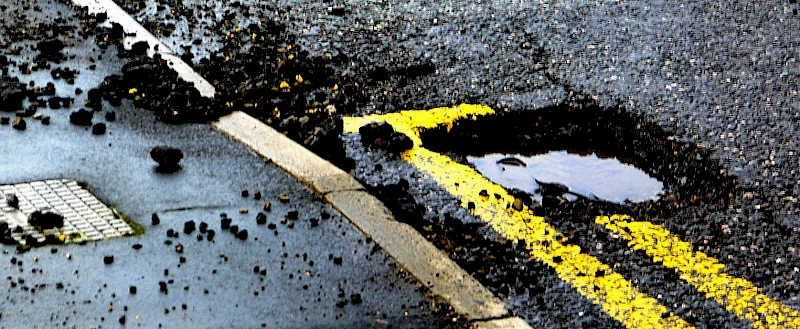
If you notice a pothole, damaged pavement, broken road sign, dangerous barrier, lighting problem, flooding, or another road infrastructure issue in the Republic of Cyprus, you can report it through the FixCyprus mobile app. The report is submitted with a photo, geolocation, and comment, after which it is automatically forwarded to the relevant district office of the Public Works Department.
FixCyprus is designed specifically for problems in the road network and infrastructure that affect traffic safety. Improper parking, disputes with neighbors, private property, and urgent emergency situations are not handled as standard reports in the app.
- FixCyprus app
- What problems can be reported
- How to submit a report
- Which reports may be rejected
- What to do in an urgent danger
- Useful services for drivers
- Glossary
- Frequently asked questions
FixCyprus app
FixCyprus — a mobile app for reporting road infrastructure problems in the Republic of Cyprus. It was developed by the KIOS Research and Innovation Center of Excellence of the University of Cyprus in cooperation with the Public Works Department of the Ministry of Transport, Communications and Works.
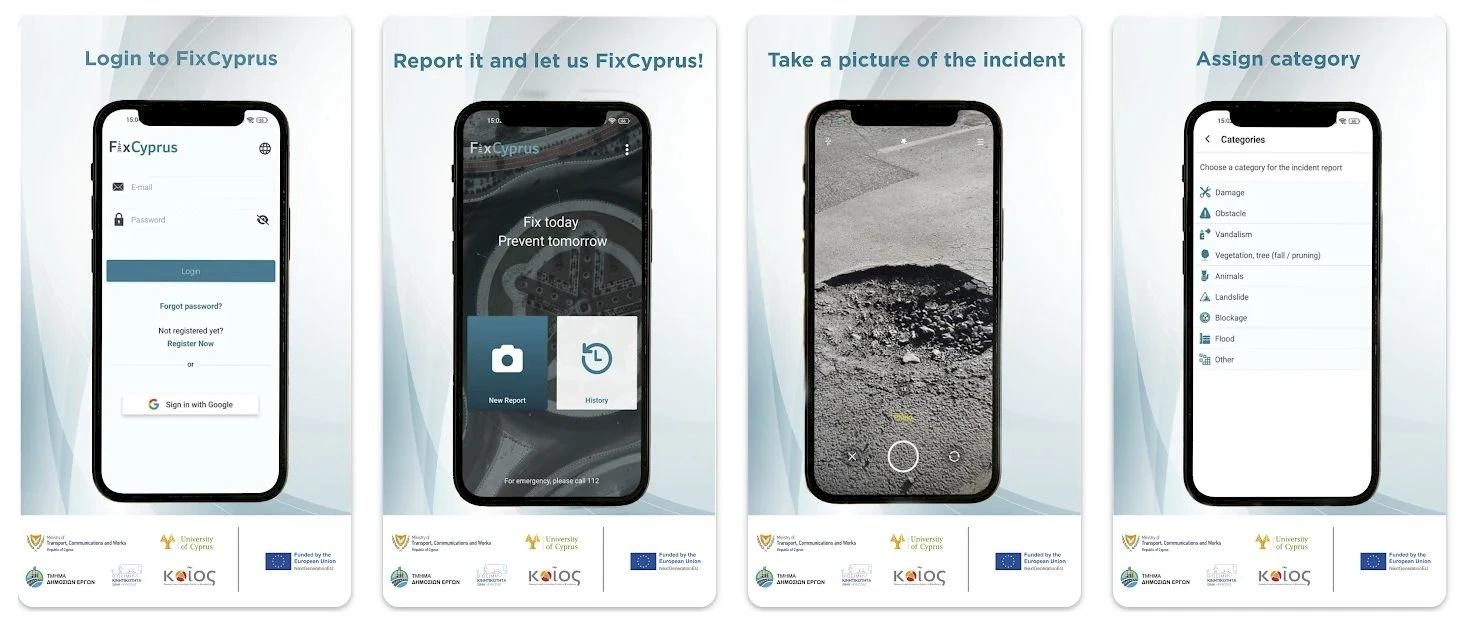
The app is available for iOS and Android. After registration, the user can create a report, attach a photo, confirm the location, and add a comment. The report is sent to the district office of the Public Works Department based on the geolocation of the report.

What problems can be reported
Through FixCyprus, you can report defects and risks related to the road network and roadside infrastructure. It is important that the issue relates to public infrastructure and may affect traffic safety.
| Type of problem | Examples |
|---|---|
| Road damage | Potholes, subsidence, damaged surface |
| Road equipment | Damaged signs, barriers, bollards, bus stops |
| Sidewalks and crossings | Broken pavement, damaged pedestrian crossing |
| Lighting and traffic lights | Faulty lighting, damaged traffic light |
| Obstacles and blockages | Objects on the road, blocked drainage infrastructure |
| Flooding | Water accumulation on the road after rain |
How to submit a report
How to do it
- Install the FixCyprus app from Google Play or the App Store.
- Create an account: registration uses an email address and password.
- Select the interface language. Greek and English are available in the app.
- On the main screen, select New Report.
- Allow camera access and take a photo of the problem.
- Confirm the location. The report is linked to geolocation, so it is better to submit it near the problematic area.
- Select the problem category and infrastructure type.
- Add a short comment: what exactly is damaged, where the problem is located, and why it is dangerous.
- Tap Submit Report.
- Track the status of the report in the History section.
After submission, the report is reviewed by the district office of the Public Works Department. If the report meets the app’s conditions, it is forwarded to the responsible authority for planning and carrying out the work.
Which reports may be rejected
FixCyprus is not a universal channel for any complaint. A report may not be accepted for processing if the issue is not related to road infrastructure or falls outside the компетence of the Public Works Department and related services.
- improper parking;
- traffic violations by a specific driver;
- disputes on private property;
- problems inside a residential complex or private yard;
- commercial complaints;
- messages without a clear photo or exact geolocation;
- reports containing personal data of third parties, advertising, or insults.
The FixCyprus terms of use separately state that the user is responsible for the content of the information submitted. Do not add other people’s personal data, document numbers, close-up faces of passers-by, or advertising messages to photos or comments.
What to do in an urgent danger
If road damage creates an immediate threat to life or traffic, do not limit yourself to a report in the app. In an emergency, call 112. For urgent incidents, the number 199 is also used.
| Situation | Where to contact |
|---|---|
| Pothole, damaged sign, broken barrier | FixCyprus |
| Immediate danger to traffic | 112 or 199 |
| Improper parking | Police or municipal service, not FixCyprus |
| Problem on private property | Property owner, management company, or municipality |
Useful services for drivers
If you drive regularly in the Republic of Cyprus, other services for motorists may also be useful:
Glossary
- FixCyprus — a mobile app for reporting road infrastructure problems in the Republic of Cyprus.
- Public Works Department — the Department of Public Works, which processes and distributes reports on road infrastructure.
- New Report — a new report in the FixCyprus app.
- History — the section of the app where the user can track the status of submitted reports.
- Geolocation — the coordinates of the place where the problem was recorded.
Frequently asked questions
Can I report a poor road without a photo?
The app is designed for reports with a photo, geolocation, and comment. Without a photo or exact location, the report may not be processed.
Do I need to be near the problem area?
Yes. FixCyprus uses geolocation, so it is better to submit the report right near the road section or infrastructure object you are reporting.
In which languages does the app work?
Greek and English are available in the app.
Can I use FixCyprus to complain about improper parking?
No. Improper parking does not fall under the usual reports in FixCyprus. Such issues are the responsibility of the police or municipal services.
Who sees my report after it is submitted?
The report is automatically sent to the relevant district office of the Public Works Department according to the geographic location of the report. It is then assessed and, if necessary, forwarded to the responsible services.
Can I track the status of a report?
Yes. The status of submitted reports is available in the History section of the FixCyprus app.
Author

I am a person who is not afraid to change life when my heart tells me that something greater lies ahead. I am originally from Belarus. I have journeyed from pedagogical and economic education to the financial sector and many years of work in logistics — a world where everything moves, changes,…